



We’ve all been in a situation where we’re researching a product, we hit the pricing page, and a massive, demanding form pops up asking for our life story. And we suddenly close the tab.
Now, picture a different scenario. A visitor is on your demo page, hovering near the “Contact Us” button. A small, friendly chat bubble appears with a single, useful question: “Curious about our enterprise plan features?” In under a minute, they’ve answered two questions, shared their email, and booked a call.
That’s the beauty of a well-executed AI widget. It’s not about flashy tech; it’s about reducing friction at the exact moment someone is considering your product. This guide will show you how to use these tools to genuinely grow your pipeline, based on what I’ve seen work (and fail) in the wild.
How AI Widgets Actually Work
AI widgets are just bits of code that let you interact with visitors in real-time. You see them as chat bubbles, pop-ups, or little toolbars. Behind all that, they use a mix of simple rules and, increasingly, language models to make conversations feel less robotic.
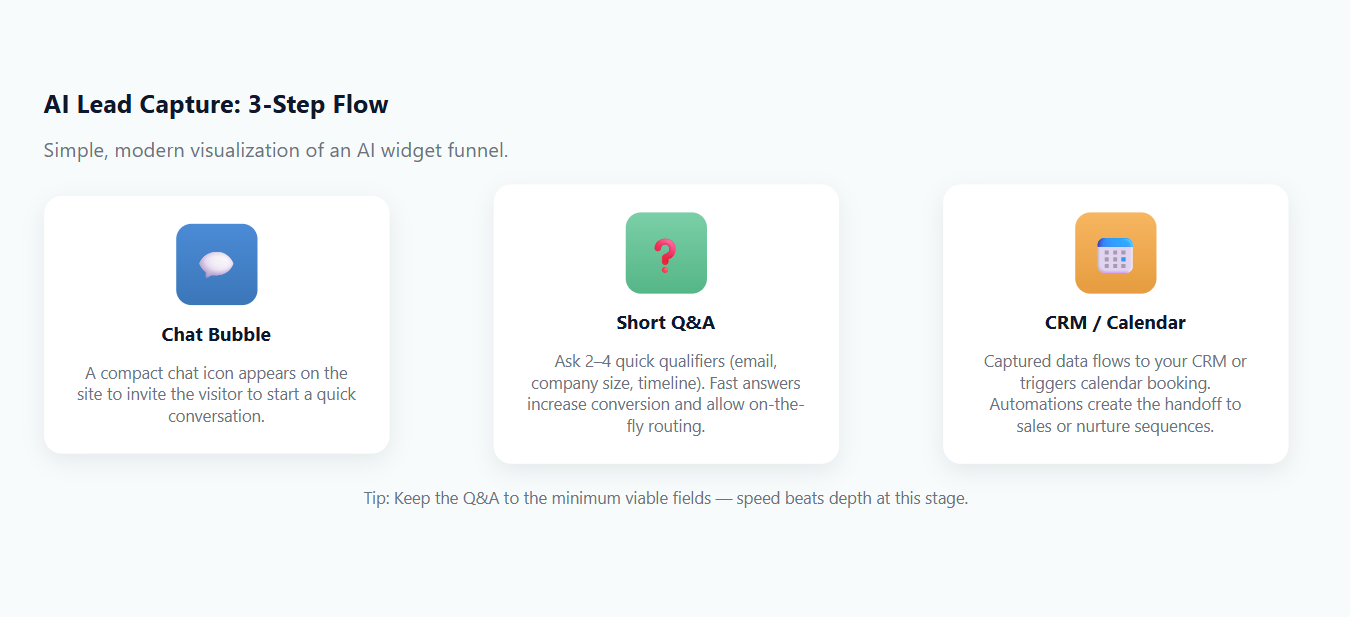
For lead capture, they excel at five simple jobs:
- Lower the Barrier: Humans are lazy (I am, you are). Clicking a button is easier than typing. A good widget breaks down a form into a few button-based questions, dramatically increasing completion rates.
- Qualify on the Fly: You don’t need a prospect’s entire history upfront. A great widget grabs the minimum viable details, email, company size, timeline, giving your sales team just enough to prioritize a follow-up.
- Create Instant Momentum: The best interactions end with a clear, immediate next step: a booked meeting, a delivered PDF, or a personalized follow-up email. The quicker the reward, the higher the conversion.
- Feel Human, Not Scripted: The best widgets sound like real people, not call center bots. A touch of warmth or humor keeps visitors engaged long enough to finish the exchange, and remember your brand kindly.
- Adapt in Real Time: Great widgets don’t stick to a script. They adjust questions or tone based on how someone responds, keeping the conversation natural and the lead quality higher.
Where the “AI” part comes in is making this feel less like an interrogation and more like a helpful nudge. It can handle follow-up questions, route users based on their answers, and even prefill data it can infer.
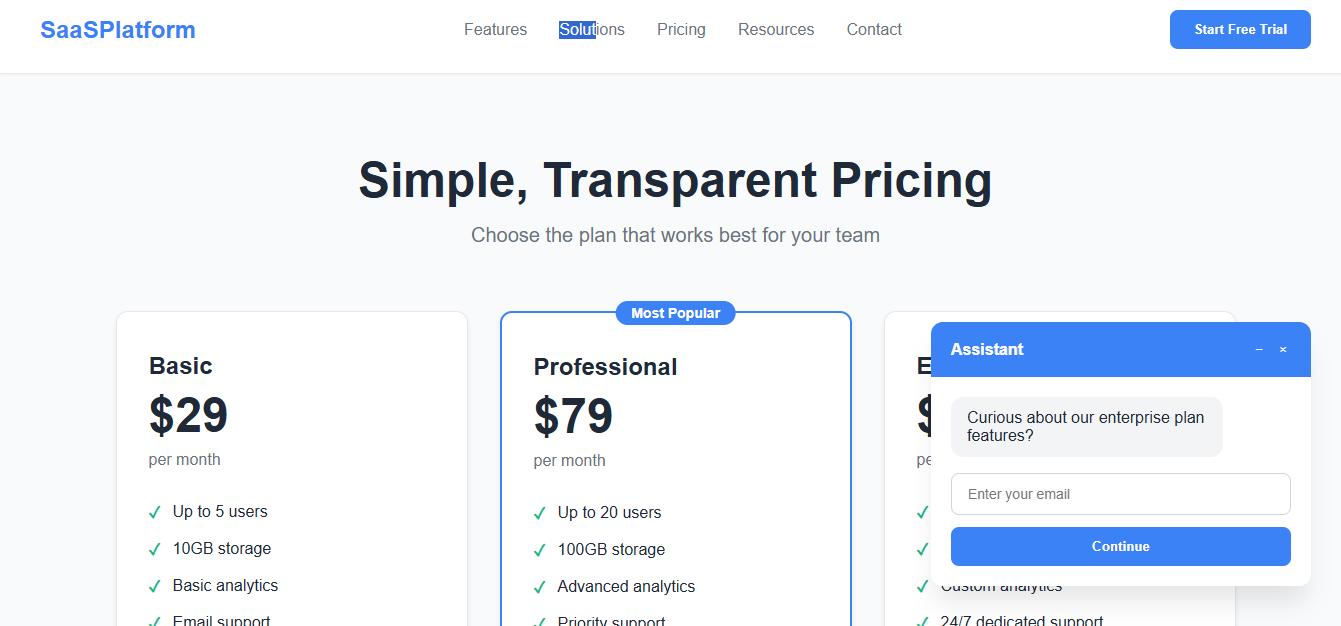
As seen in the example above, an AI widget can appear on a pricing page, prompting a simple, low-friction question that guides visitors to share their details without interrupting their flow.
The goal is to automate the initial qualifying conversation, so your team only talks to warmed-up leads.
Picking the Right Tool
Don’t start with the shiniest demo. Start with your goal. Are you booking enterprise demos or growing a newsletter list? The tool and flow will be completely different.
Map your single desired outcome first, then pressure-test it with these real-world constraints:
- Integration: Where do leads live? If it’s Salesforce or HubSpot, confirm native integration. If you’re patching it together with Zapier, know that you’re adding a potential point of failure.
- Scale & Cost: Pricing is a minefield. Some charge per seat, some per conversation, and others meter “AI resolutions.” My advice? Estimate your monthly conversations and then look at pricing models. Watch out for brutal overage fees.
- Control & Compliance: This is a big one. If you’re in a regulated industry, you need explicit guarantees on data handling. Ask: Where is our data stored? Are you using our conversations to train your AI? Get this in writing.
- Finally, match the tech to the task. For simple qualification, a basic scripted flow is cheaper and more reliable. If visitors expect to ask complex questions, you’ll need an LLM-powered bot, but be prepared to build guardrails and monitor it for weird answers.
AI Lead Capture Widget Pricing Comparison
I pulled this together from vendor sites and my own conversations. Treat it as a starting point for your shortlist, but always confirm with the vendor, as this stuff changes fast.
| Vendor | Free tier? | Entry / typical starting price (monthly) | How it scales / limits (quick) | Notes on AI & data |
|---|---|---|---|---|
| Drift | No freemium (custom quote) | From $2,500/mo+ | Enterprise-level pricing, custom seats and conversation volume | Strong B2B focus; real-time qualification and routing |
| Intercom | Yes (trial / limited free) | From $29/mo | Scales by seats, features, and AI resolutions | Built-in AI agents and support automation |
| Qualified | No (custom quote) | Custom pricing | Enterprise ABM model | AI SDR for B2B inbound; tailored to Salesforce pipelines |
| Landbot | Yes | From $45/mo | Plans scale by chats/month and AI usage | Good no-code builder; clear AI chat allotments |
| Tidio | Yes | From $29/mo | Scales by conversations and AI access | Affordable for small teams; includes Lyro AI agent |
| ManyChat | Yes | From $15/mo | Scales by contact count & channel | Great for WhatsApp, IG, and social-first engagement |
| HubSpot | Yes | Free chat builder; paid CRM tiers add features | Tiered seat and workflow pricing | Excellent if already using HubSpot CRM |
| Collect.chat | Yes | From $18/mo | Fixed-tier plans by bots/responses | Conversational forms; light on AI |
| Botpress | Yes | Pay-as-you-go | Workspace fee + token usage | Developer-first; strong for privacy & LLM routing |
| OptinMonster | No (refund policy) | From $9–$19/mo | Tiered by site, pageviews, features | Not AI-native but pairs well with chat widgets |
Rolling Out AI Lead Capture Widgets the Right Way
A successful rollout is a controlled experiment, not a big bang. Take a step at a time
- Write the Script First: Before you even log into a tool, draft the conversation. For lead capture, a two-step flow is often all you need: one qualifying question and the email capture. Keep the language human and the value proposition clear: “Let’s get you a demo” or “I’ll send the pricing sheet right over.”
- Choose Triggers Wisely: On a pricing page, a time-on-page trigger of 20 seconds makes sense. On a blog post, an exit-intent trigger is less intrusive. Match the interrupt to the page’s intent.
- Wire the Plumbing: Connect the widget to your CRM and notification system (like Slack). Set up a simple rule: “If lead is from an enterprise, alert the sales team channel immediately.” Test this flow thoroughly.
- Shadow Mode is Your Friend: Run the widget for a week but send the leads to a test list. Read the transcripts. Where do people drop off? What questions does the bot fail to answer? This is your tuning phase.
- Iterate with A/B Tests: Change one thing at a time, the opening line, the CTA button color, the qualifier question. Run each test for at least two business cycles to avoid weekly noise.
Privacy Compliance with AI Lead Generation Tools
Chat logs can contain surprises. Treat this data with care.
- Don’t Collect What You Don’t Need: Avoid asking for sensitive PII unless it’s absolutely critical. If you do, include a brief consent notice.
- Interrogate Vendor Policies: Ask pointed questions: “Do you use our data to train your models? Can we opt-out? Where is our data physically stored?” Prefer vendors who give you clear, contractual answers.
- Control Internal Access: Not everyone in the company needs to see chat logs. Use role-based permissions and have a process for handling data deletion requests.
- Encrypt Everything, End to End: Data in transit and at rest should never be left exposed. Use TLS for chat sessions and confirm that stored logs are encrypted, ideally with your own managed keys, not just the vendor’s default.
- Review and Purge Regularly: Schedule periodic audits to delete stale or unnecessary chat records. Old data is a liability, not an asset. Build cleanup into your quarterly workflow, not as an afterthought.
Measuring What Actually Matters
Forget “conversations started.” Focus on the metrics that impact revenue.
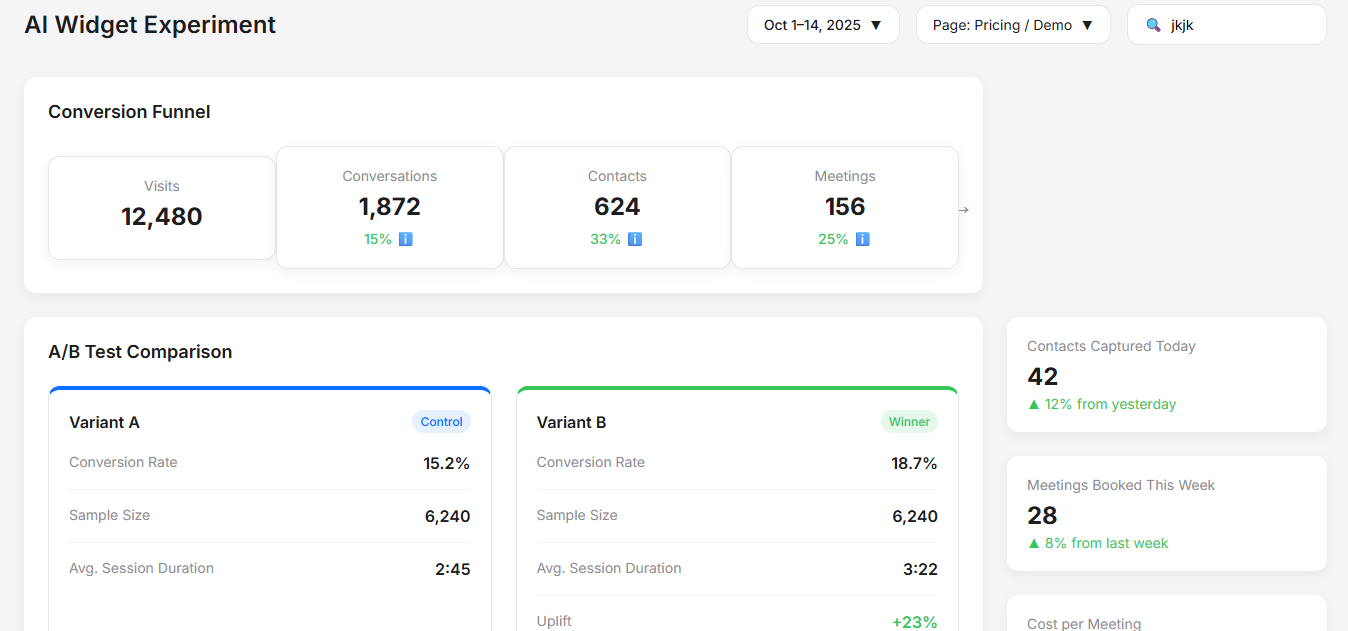
Build a simple dashboard that tracks this funnel:
Widget Visits → Conversations Started → Contacts Captured → Meetings Booked → Qualified Opportunities.
Let’s talk about what really moves the needle after you’ve captured a lead. Speed is your ultimate ally here.
A lead that gets a personal reply within five minutes is infinitely more valuable than one that lingers for days; that initial “golden hour” is when their interest is highest and your competition is most likely to swoop in.
But that speed can’t come at any cost, which is why you need to keep a sharp eye on your bottom line. When calculating your cost per qualified meeting, remember to include the entire picture, not just the widget’s subscription fee, but any potential overage charges that can quietly blow your budget.
And don’t just look at the numbers; listen to the conversations. If you notice a bunch of people repeatedly asking the same unanswered question about pricing or a specific feature, it’s a clear signal that your website copy has a gap. Addressing that single theme can improve your entire user experience and make your AI widget even more effective.
Your First Experiment: A 2-Week Sprint
Don’t overthink it. Pick your highest-intent page (pricing, demo, etc.).
1. Draft a 2-Step Flow:
- Step 1: “Are you looking for pricing for a team larger than 50 people?” (Yes/No)
- Step 2 (if Yes): “Great, I can get you a custom quote. What’s your email address?” + “Send me the quote.”
2. Pick a simple tool like the free tier of HubSpot or a Landbot starter plan.
3. Run it for two weeks and track just three things: Contacts Captured, Meetings Booked, and Cost per Meeting.
If it works, you’ve just added a new, scalable channel. If it doesn’t, you’ve learned something cheaply. That’s a win either way.